Customizable Club Types for Your Union
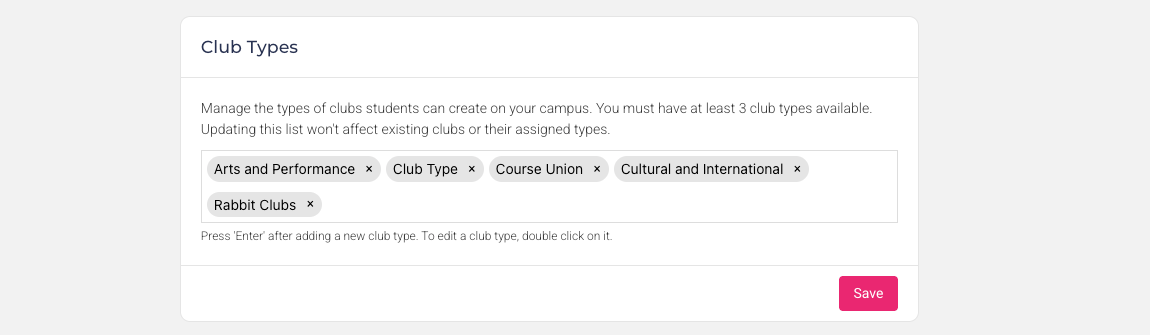
We’re excited to introduce a new enhancement that gives you greater control over how clubs are organized within your platform. You can now fully customize the Club Types available in your organization, allowing you to better match your internal structure and create a more intuitive experience for your users.
This update provides more flexibility over the way clubs are categorized, helping you create setups that are clearer, better aligned to your organization, and easier for users to navigate.
What’s New
Inside the settings area, you’ll now find a new Club Types section where you can:
Add New Club Types – Create categories that reflect your organization’s unique structure.
Edit Existing Types – Rename or adjust existing club types to keep everything consistent.
Control What Users See – Ensure club creators select from the correct, tailored options.
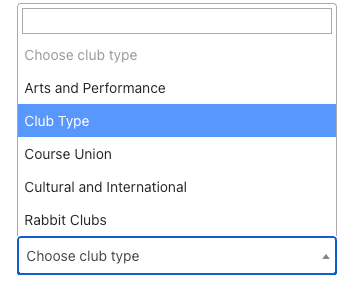
Any changes you make here will automatically update the create rubric club page, ensuring a seamless and consistent user experience across your entire system.
How It Works
Navigate to the Club Types settings in your admin panel.
Add or customize the club types you want available.
Save your changes.
The create rubric club page page will instantly reflect the updated selection options.
This enhancement helps you create:
Clearer club structures tailored to the way your organization operates
More intuitive user experiences when creating or managing clubs
Consistent categorization across all club-related workflows
Flexible setups for different departments, campuses, or activity groups
By giving you more control over your club configuration, organizations can make club creation more structured, logical, and aligned with real-world needs.
Note:
Updating your Club Types will not affect any existing clubs.
All previously created clubs will retain their original club type.
New or edited types will only apply moving forward when users create new clubs.