Version History Now Available on All Submissions

Keeping track of what was submitted and what changed just got a whole lot easier.
We’ve introduced Submission History for form submissions, giving you a complete record of previous submissions when a form is submitted more than once. You can now look back at earlier answers directly from the submission, making it easier to understand what changed and what was originally provided.
See the complete submission history
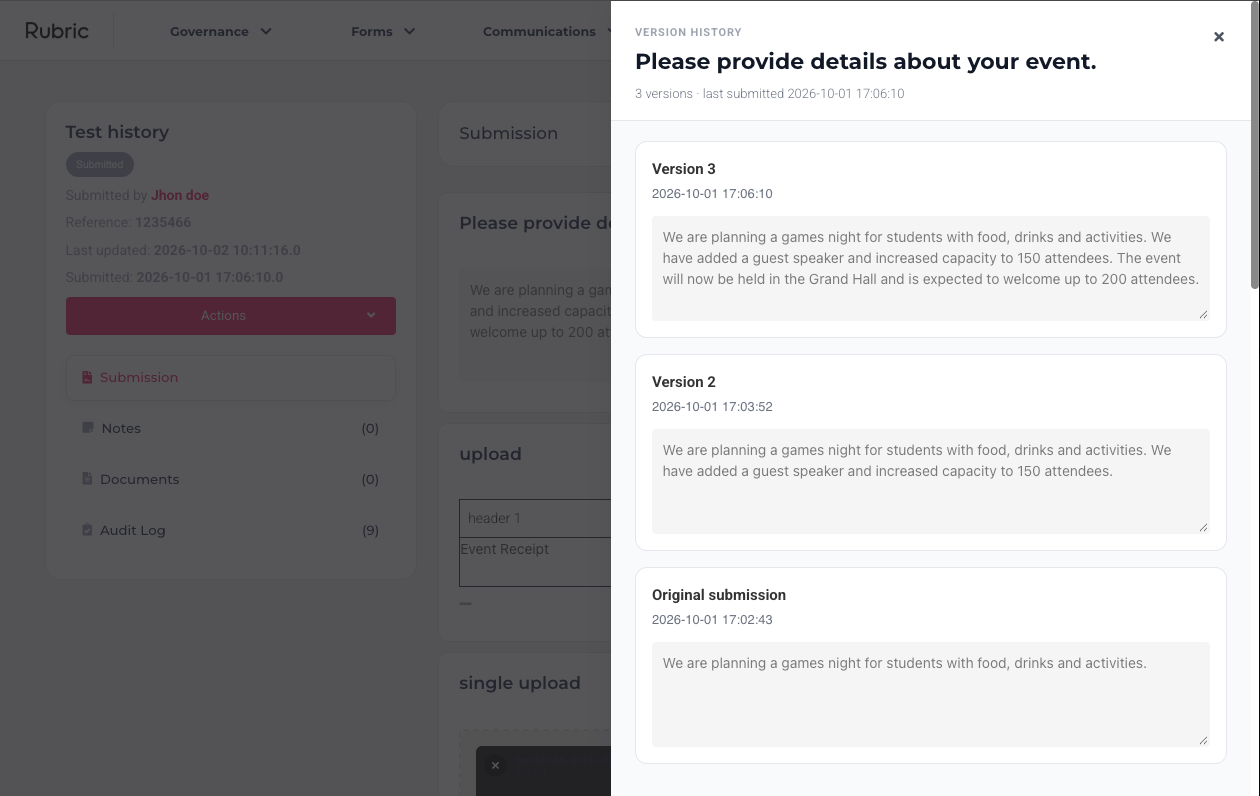
The History button appears whenever a submission has more than one version. Open it to see every version of a submission in one place, including the original response and any subsequent submissions.

The history sidebar shows each version separately, with the current submission clearly identified. You can review the answers and open any uploaded files from each version, so you can see exactly what was submitted at each point in time.
Nothing gets lost when a submission changes
When a submission is rejected and submitted again, answers are changed, or a response is rescinded and resubmitted, the previous version remains available in the history.
Instead of only seeing the latest response, Unions can go back and review what was originally submitted and compare it with the updated version. This provides a clearer record of how a submission changed throughout the review process.
Useful for reviewing submissions
Rejected and resubmitted forms: See what was originally submitted alongside the updated version.
Changed answers: Review previous answers when a student updates their submission.
Uploaded files: Access files that were included with previous submissions.
Auditing: Keep a record of what was submitted at different points in the process.
Resolving questions: Check the original response when you need to understand how or why a submission changed.
Submission History is live now!
Open any form submission and select History to see the previous versions of that submission.